Reference
Memory
Memory is what Nawa knows about you across all your chats: a profile you write, and notes the assistant proposes in conversations. It belongs to your account, not to one chat or project. For how to use it well, see Manage memory.
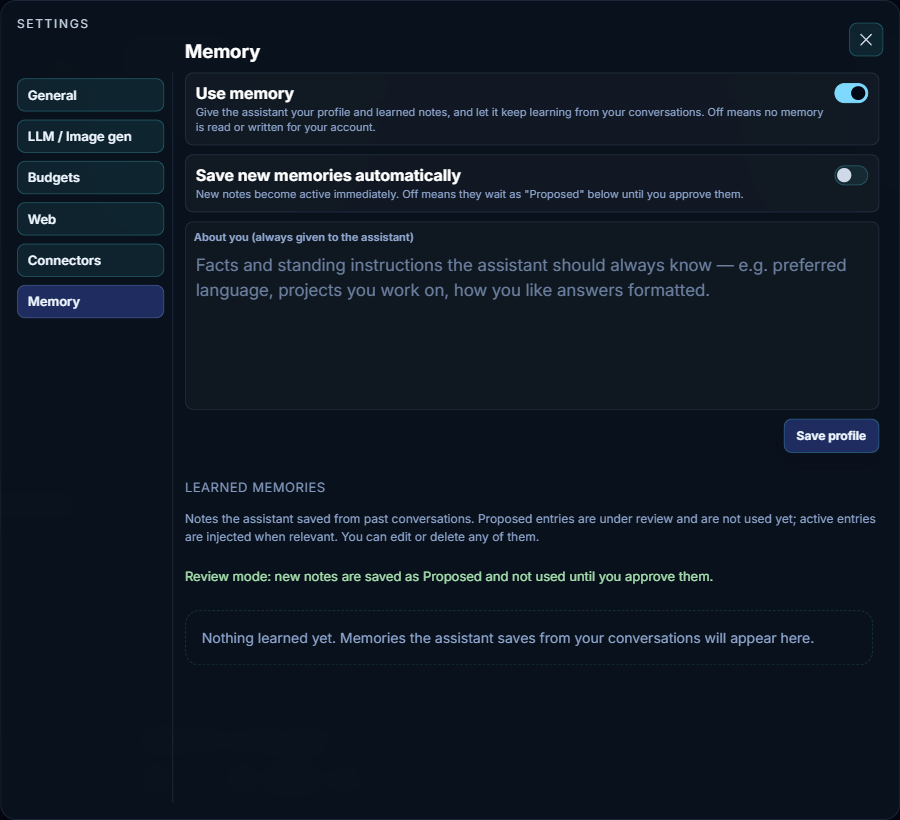
- Use memory
- When on, Nawa gives the assistant your profile, lets it look up your learned notes, and lets it propose new notes in your chats. When off, no memory is read or written for your account. Turning it off does not erase what is saved.
- Save new memories automatically
- When on, a note the assistant proposes becomes active at once. When off, new notes wait as Proposed and are not used until you save them from the card under the answer or approve them in the list below. The line above the list says which way it is set.
- About you (always given to the assistant)
- Facts and standing instructions the assistant should always have, such as your preferred language, the projects you work on, or how you like answers formatted. With memory on, it goes with every request. Press Save profile after editing; this field does not save by itself. Do not put passwords or keys here: what the assistant is given is sent to your AI provider.
- Learned memories
- The notes the assistant proposed in your chats. Each note shows whether it is Proposed (not used yet), Active (looked up when a request may depend on it) or Archived (replaced by a newer note), and offers Approve for a proposed note, Edit and Delete. Deleting a note that replaced another makes the older note active again. Deleting a note does not remove it from the chats where it first came up.
For rules that belong to one project or folder, use instructions and AGENTS.md instead of memory.