Reference
General
The General tab is where Settings opens. From top to bottom it has Appearance and responses, Privacy and permissions, Application updates, Remote access, Documentation and Debug.
Appearance and responses
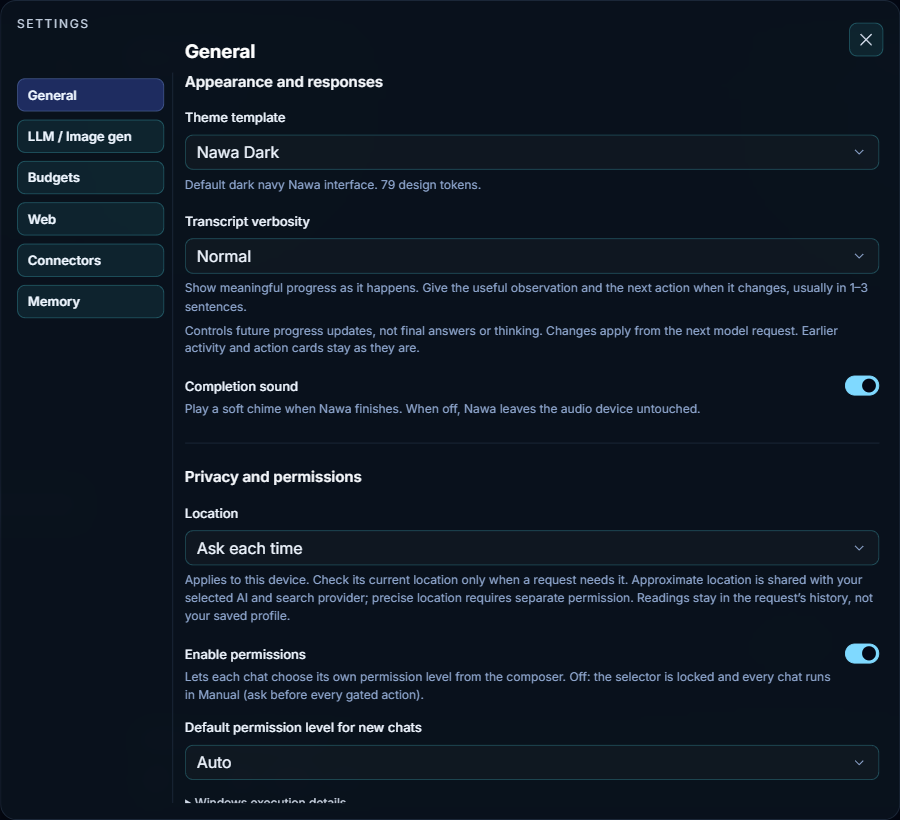
- Theme template
- The look of the whole app: colors, background, fonts, borders, shadows and surfaces. Nawa ships nine templates: Nawa Dark, Deep Indigo, Quiet Slate, Emerald Parchment, Nawa Light, Aurora Glass, Neo-Brutalist, Swiss Editorial and Phosphor Terminal. The line under the list describes the chosen template. A new template applies at once.
- Transcript verbosity
-
How much Nawa says about its progress while it works. The line under the list quotes the exact instruction each level gives the model:
- Summary — one short sentence at major milestones, changes of approach or blockers, and silence otherwise.
- Normal — meaningful progress as it happens, usually one to three sentences.
- Verbose — each useful discovery, correction and verification result, with the supporting details.
It changes progress updates only, never final answers or the model's thinking. It takes effect from the next model request; updates and action cards already shown stay as they are.
- Completion sound
- Plays a soft chime when Nawa finishes a reply. When it is off, Nawa does not touch the audio device at all.
Privacy and permissions
- Location
-
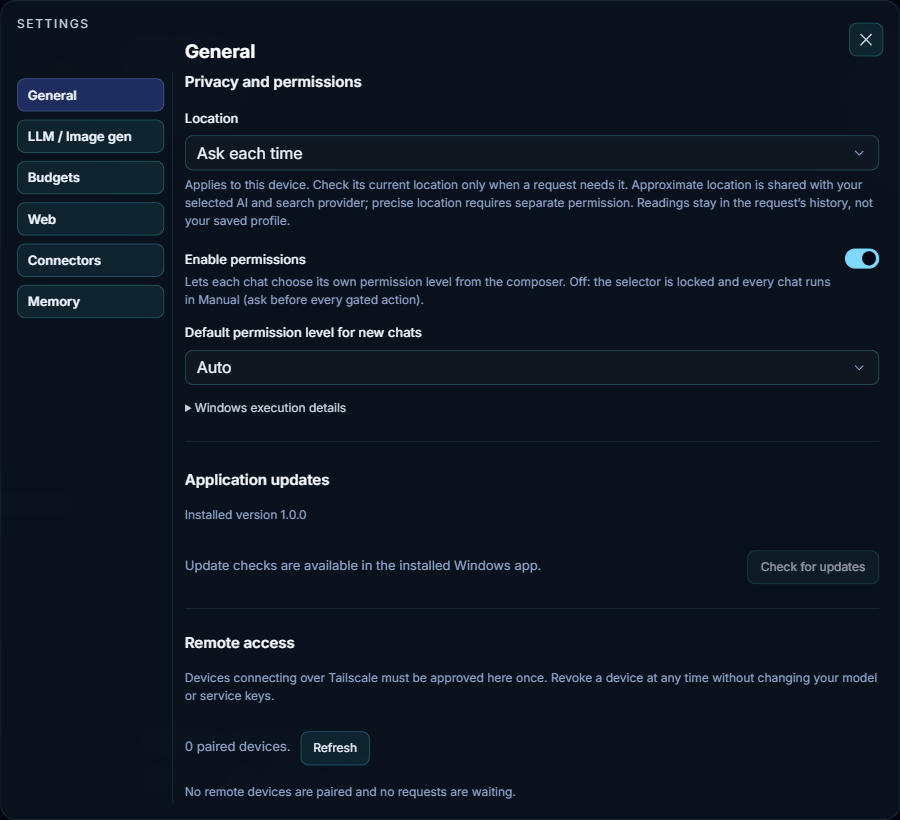
Whether Nawa may read this device's location when a request needs it, such as "restaurants near me":
- Ask each time — Nawa asks before each reading.
- Allow when needed — Nawa reads it without asking, only when a request needs it.
- Off — Nawa never reads it.
This choice belongs to this device, not your account. An approximate location is shared with your AI and search provider; a precise location needs its own permission. A reading stays in that request's history and is not saved to your profile. See Explorer and location.
- Enable permissions
- Lets each chat choose its own permission level from the permission control in the composer. When it is off, that control is locked and every chat runs in Manual: Nawa asks before every gated action.
- Default permission level for new chats
-
The level a new chat starts with. It changes new chats only; the chat that is open keeps its own level. The levels:
Level In short Manual Asks before each gated action Accept edits Work inside the chat's workspace runs; shell commands and imports ask Plan Read-only: research and present a plan; gated actions are refused Auto Runs on its own and asks only for risky actions (the shipped default) Bypass permissions No workspace prompts; connected services keep their own rules Permissions explains each level and the cards that ask you.
- Windows execution details
- Open it to read how commands run on Windows. They run at low integrity, without administrator setup. The low-integrity folders they can write to are shared, not separated per chat. Network limits are cooperative, not a firewall. Permission levels decide what asks you; they do not change this boundary. See Permissions and the sandbox.
Application updates, remote access, documentation and debug
- Application updates
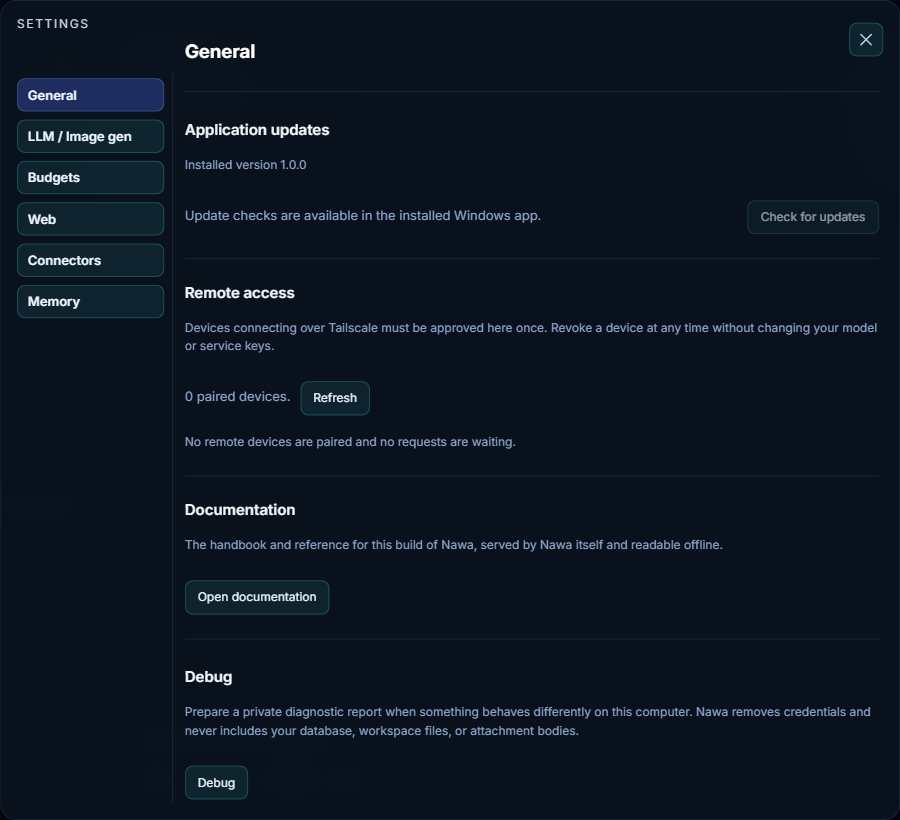
- Shows the installed version. Nawa checks for a new version automatically every six hours; Check for updates checks now. An update downloads in the background while you keep working, with its progress shown here and at the top of the window; Install then runs the installer and relaunches Nawa with your settings, chats and automations intact. If a check finds nothing but you expect an update, use Check Again after a minute. The screenshot comes from a test copy, which cannot update itself; the Windows app shows its real version and state. See Install Nawa.
- Remote access
- Other devices can reach this Nawa over Tailscale, but each one must be approved here once. The list shows waiting requests, each with Approve and Deny, and paired devices, each with Revoke; Refresh reloads the list. Revoking a device does not change your model or service keys. This section appears only in Nawa on this computer, never to a remote device.
- Documentation
- Open documentation opens this documentation in your browser. It is served by Nawa itself, matches this build, and works offline.
- Debug
- Debug prepares a private diagnostic report when something misbehaves. Describe what happened, choose where the report goes (Save on this computer unless another destination is offered), and choose whether to include recent messages from the current chat. The report holds app and system facts, redacted settings, recent logs, the current trace and recent automation and build status. Credentials are removed, and your database, workspace files and attachment contents are never included.