Reference
Connectors
The Connectors tab brings outside services and programs into Nawa: your Google and Microsoft accounts, MCP servers and plugins, and the permission each of their tools has. For adding a connector step by step, see Plugins and connectors.
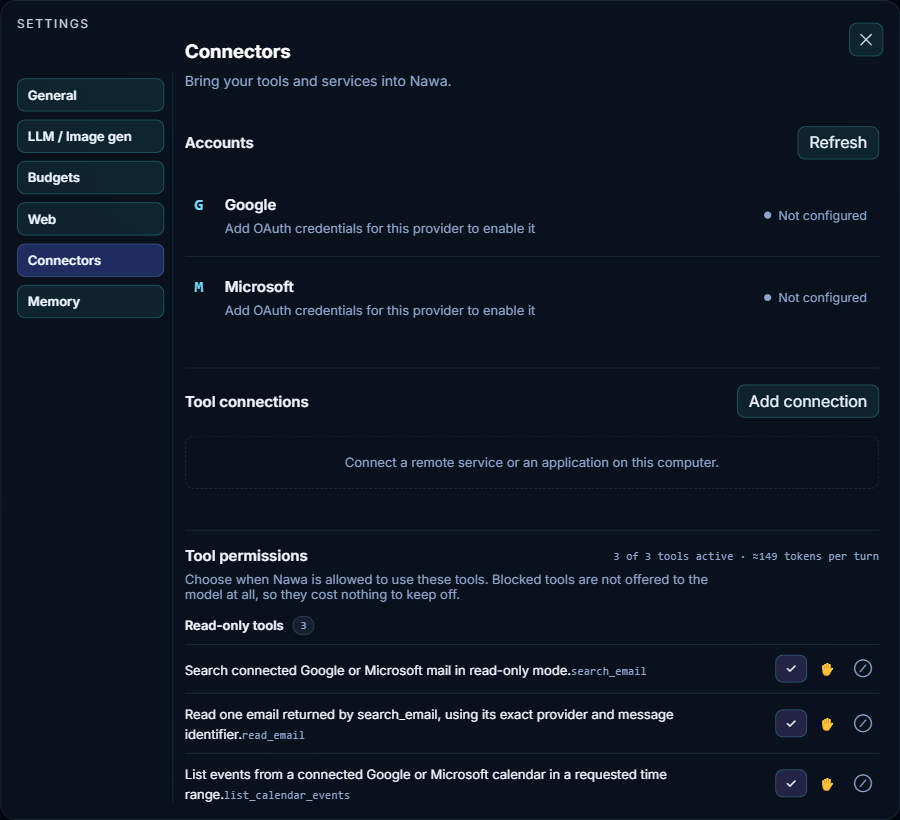
Accounts
Google (Gmail and Calendar) and Microsoft (Outlook mail and Calendar) each have a row with its state and a button:
- Not configured — this installation has no OAuth client for the provider, so it cannot connect yet. The client ID comes from Nawa's configuration or the
NAWA_GOOGLE_CLIENT_IDandNAWA_MICROSOFT_CLIENT_IDenvironment variables. - Not connected — Connect starts the provider's sign-in in your browser.
- Connected — Disconnect removes the connection.
- Needs authentication or Disabled — the sign-in has expired or been withdrawn; Reconnect signs in again.
Refresh reloads the states, for example after you sign in in the browser.
Tool connections
The MCP servers Nawa can use: connectors you add here and the servers of installed plugins. Each entry shows its state and, once connected, its tools. When nothing is connected, the list says so.
Add connection opens two choices:
- Browse connectors — the public MCP endpoints of common services, such as Gmail, Google Calendar, Drive, Slack, Jira, Linear, GitHub, Notion and Stripe, plus the local Chrome control. A remote entry asks you to sign in with the service.
- Add custom connector — any MCP server: an
https://address with optional headers, or a command that runs on this computer, with its arguments.
Each tool of a connection has its own permission, chosen from its entry: Ask first, Always allow or Off, and for plugins also Automatic, where routine observations run and actions that change something ask.
Tool permissions
The tools that the Google and Microsoft accounts provide, grouped by kind, such as Read-only tools. You can set them before an account is connected. Each has three buttons:
| Button | Meaning |
|---|---|
| ✓ Always allow | Nawa uses the tool without asking |
| ✋ Needs approval | A card in the chat asks you each time; see Permissions |
| ⊘ Blocked | The tool is never offered to the model |
The heading counts the active tools and estimates what their descriptions cost in each request, for example "3 of 3 tools active · ≈149 tokens per turn". A blocked tool is left out of the model's list entirely, so it costs nothing to keep off.